Session Buzz: Who’s Recording In & Around NYC — A Monthly Report
March 9, 2011 by Janice Brown
/* Filed under Deli Feed, NYC Spotlight, SPARS Feed */
GREATER NYC AREA: Both through the grapevine and straight from the source(s), we’ve been hearing about a number of different recording projects going on in studios throughout the NYC area. The following is but a sampling of recent sessions, and works in progress…a snapshot of what’s going on around town:
Starting in Williamsburg, Chrissie Hynde and J.P. Jones are cutting their new album at Mission Sound this month, with Victor Van Vugt producing. Hynde and Jones released their debut collaboration, Fidelity, as J.P., Chrissie and the Fairground Boys last summer.
A couple stops away on the L train at The Brewery, Staten Island-native hip-hop veteran JoJo Pellegrino and producer Lofey (Nas, Foxy Brown, Beanie Sigel) wrapped up mixing Pelligrino’s upcoming mixtape with engineer Andrew Krivonos.
For the song “Love,” which features Chris Brown, they guys completely mashed up the track with a new instrumental and had to make pitch and time elastic audio changes in Pro Tools — complete surgery — spending 20+ hours over a three-day stretch tweaking and perfecting little details.
“We really wanted it to have a certain feel so we worked until we got it right. We’re totally psyched about hearing the feedback on JoJo’s project,” says Krivonos. Pellegrino released the track on Monday… check it out!
Meanwhile, at J Rock Studios in Chelsea, engineer Jamie Siegel recorded with Fall Out Boy lead singer/songwriter Patrick Stump for his upcoming solo album. With Stump producing and playing drums and Matt Rubano on bass, Siegel recorded a couple key parts for the opening track of Stump’s new solo record.
“We tracked live bass (with an octave pedal) and a drum solo that added a really interesting depth to a mostly electronic track,” says Siegel. “One week after the recording session, the EP Truant Wave debuted at #5 on iTunes.”
Downtown, the new Will Knox album was being produced entirely within Flux Studios on the Lower East Side. Produced by Fabrice “Fab” Dupont and recorded by Flux chief engineer Meredith McCandless, the album was tracked live to a minimal amount of tracks over 4 days and mixed the following week over a couple of days by McCandless and Dupont.
“There was no editing, no tuning, no MIDI, just a few B3, Wurlitzer and Glockenspiel overdubs,” Flux manager Chris Sipes relays. “Old school spirit for a new school sound!” Dupont also mastered the record, which is being released as a comic book with download codes for the music — no CDs are being printed.
And at Germano Studios, Keith Richards has been writing and recording new material with NYC native multi-instrumentalist producer Steve Jordan. NYC-based Dave O’Donnell engineered these sessions in Germano’s Studio 1.
Across the Hudson, Brooklyn-based singer/songwriter Jennifer O’Connor has been recording at Tom Beaujour’s Nuthouse Recording in Hoboken. Beaujour is co-producing, recording and mixing, and collaborators include Jon Langmead on drums, Michael Brodlieb on bass, and cameos by Kendall Meade (Wurlitzer), Richard X. Baluyut (vocals and guitar) and Amy Bezunartea (vocals and guitar).
And just a ways up the River, at Bicoastal Recording in Ossining, jazz singer/songwriter Michael Franks and bassist/producer Mark Egan worked on a new song, featuring Clifford Carter on keys, Joe Bonadio on drums and Chuck Loeb on guitar. Bicoastal owner Hal Winer was the engineer. In another recent session at Bicoastal, NYC string quartet Ethel recorded with engineer/producer Dave Cook, and Francois Moutin tracked some new material with trumpeter Lew Soloff and vocalist Anne Sila with Winer engineering.
Back in Manhattan at Threshold Studios, Freelance Whales were recording and mixing a new track with Jeremy Sklarsky engineering and co-producing. Sklarsky also recently engineered sessions with composer Tim Janis and Alexa Ray Joel. Check out Threshold’s new website/blog at www.thresholdstudios.com.
Over at Stratosphere Sound, where songwriter/producer Amanda Ghost and producer Dave McCracken have recently taken up residence, Florence Welch was in for writing sessions with Ghost — McCracken producing and Andros Rodriguez engineering — and John Legend was also in for sessions with the duo, engineered by Adam Tilzer.
And as previously reported…
Kim Gordon, Thurston Moore and Yoko Ono are making a record together at Sear Sound in Midtown Manhattan. Chris Allen is engineering.
Fluxivity, Nat Priest’s custom Neve 8048-equipped Williamsburg studio, recently hosted Matt Mays with engineer/producer Ted Young, and Juan Son with Blonde Redhead drummer Simone Pace producing and Brian Thorn engineering.
Also, portions of Kurt Vile’s latest Matador album, Smoke Ring For My Halo, were recorded and mixed by producer/engineer John Agnello at Fluxivity, along with a few other local studios, including Magic Shop, Headgear, Water Music and Vacation Island.
Speaking of Vacation Island, it seems Beirut recently mixed their latest record at the Brooklyn studio with producer Griffin Rodriguez.
And speaking of Headgear, Agnello has also been working there with Joy By Proxy, Andy Shernoff and Sons of Bill. And coming up, he’ll be tracking and mixing a new album there with Staten Island-based indie rock foursome Cymbals Eat Guitars.
And we know there’s so much more going on out there! If you’d like to be featured in “Session Buzz,” please submit your studio news to submissions@sonicscoop.com.
Sound Mix: Joe Mendelson & The Road From Music to Gramercy Post
March 7, 2011 by Janice Brown
/* Filed under NYC Spotlight, SPARS Feed */
GRAMERCY, MANHATTAN: There’s an astrological phenomenon known as the Saturn Return, and it pulls especially hard on us creative types. The theory goes that as we hit age 27 – 30, we start to re-evaluate our path, looking ahead, and tend to recalibrate. Job and relationship changes often ensue.
And in music, one may rethink the path to greatness, if not the ‘greatness’ itself — rockstardom, for example, may seem incredibly less likely at age 29 than it did at age 20.
NYC-based audio post mixer and recording engineer Joe Mendelson had exactly this kind of experience in his late 20s. He’d been living out his musical dreams — playing in bands, engineering records, partnering in studios and even a club (The Living Room); he’d had a few record deals, toured, even been on MTV with his most successful band Rise Robots Rise.
It was the late 90s when, a few years after his last record deal and his 30th birthday looming large, Mendelson began to think hard about the future. He was gigging, engineering and writing music, but he was struggling financially.
“I realized I had two choices,” says Mendelson. “Go back to school and learn a new trade, or take what I already knew — how to manipulate sound — and turn it into something profitable.”
These were the first inklings of what would eventually become Gramercy Post, Mendelson’s now Emmy-winning post-production studio for films and documentaries, television, commercials, music and aural branding. It’s been over 10 years since his transition to audio post-production, but Mendelson’s path and insights are incredibly relevant to those pondering any kind of audio career overhaul. He breaks it all down and then some here. Read up!
SonicScoop: How would you describe yourself and what you do?
Joe Mendelson: I’m an audiophile and I’ve dedicated my professional life to sound and making things sound better. It’s a tough time in our craft because I feel like a decreasing number of people care about these things. A lot of times you feel like you’re trying to uphold a beautiful art form and craft in an increasingly hostile environment — the modern world of MP3s, earbuds, YouTube and reality television.
So you feel that the mass acceptance of lower-quality audio, as experienced via MP3 and earbuds, has had an effect on the quality of audio on television?
I think we’re living in a great era of bifurcation and duality. We’re seeing some really great, amazing high-end work, but by its very nature it’s limited because it’s expensive. [This is] on the big blockbuster movies and premium cable channels where they’re spending a lot of money on every aspect of the production, from the visuals to the sound, every aspect of it is expensive.
And the people who get to work on the sound for these productions make a decent living doing some really great art. However, there’s not so much of that work to go around – there’s only so many Losts, and Mad Mens, etc.

Gramercy Post took home the Emmy for "Outstanding Individual Achievement in a Craft: Music & Sound" for its work on "WWII in HD."
But there’s also a lot of seemingly high-level documentary-style TV programming. Where does that fall?
There are a handful of these highly regarded scripted cable shows like Breaking Bad or Mad Men or Damages – and the production value on those shows is very high. And then everything else on cable is almost a race to see who can spend the least. There’s a tremendous amount of reality television, which is premised on the point that it’s cheap to produce. That’s one of the reasons you see so much of it!
Then there’s a lot of this documentary-style programming you might see on Discovery and History Channel, Nat Geo, etc. and the audience is really fragmented for these programs. We’ve mixed for all these channels – Fuse, Science Channel, Spike, HGTV, Bravo, A&E – there are dozens of these channels doing the documentary style production. For some of these shows, getting 1 million people to watch is a huge audience.
The subscription channels like HBO and Showtime are in a class by themselves. That’s the little bit of really high-end work up at the top for the rarefied few. And in that sense, it’s the same as the music business — if you’re working with Beyonce, you’re up there at the very top, and then there’s the indie level. And there’s very little in between – but there is what I refer to as “the quality middle,” really good but perhaps more specialized programming with a decent budget. And that’s a lot of the work we get.
So tell us a bit about how you built your audio post facility. You were coming from the music side – playing in bands and engineering records. When you decided to change course, how did you get started?
Well, this is one of the real challenges for a lot of artists — if you got to be any good at all as an artist, it’s partially because you dedicated yourself to that one thing, which by definition means that you don’t know how to do anything else! What do you do? I thought…OK, I know how to manipulate sound. What can I do with that?
I knew about places like Sound One and this thing called post-production. I knew that films got mixed, though I wasn’t sure how exactly that happened. I also heard about numbers, about how an hourly rate for a post studio could be higher than what the Hit Factory was charging at that time. That’s about all I knew though.
So I took out my credit card, and I bought a Pro Tools rig. I rented a tiny space in the Garment District – a room plus a tiny booth – and I bought a TV and a video capture card, and I set up shop. I had to do whatever I could do, so I was still making records, and writing for spots. I started telling everybody I was doing audio post now.
Sure enough… my filmmaker friends started showing up and even though they had no money, I was like bring it on! This is how I learned. I worked on as many projects as I could. If I’d done music for a spot and they were going to do a mix at a post house, I’d ask if I could go to the mix. I’d watch and ask the engineer questions. I read books. And I did project after project after project, and slowly, it started to evolve. It turned out I was good at this audio post thing!
What do you think it takes to be “good” at audio post?
If you’re coming to it from music, you have to be able to 100 percent put down this idea of having this fun, glamorous time in the studio. Let that go. This work is: make the project sound better, quickly. And it’s details. You have to meet technical specifications. It’s sound manipulation, but it’s another part of your brain. You have to work really fast, and be meticulous.
A lot of engineering of music is like that too, but here, there’s no occurrence of the happy accident. That mythology. There are no accidents (in post). You know what you’re trying to get. There’s a phenomenon in audio post where you add noise to things. The stuff that’s on there is noisy and when that goes away it’s noticeable, so we’re often adding room tone and ambience – things you’d be looking to remove in music. It’s a different calibration of your brain.
You also have to work with a different kind of client. And the clients are different from each other. Advertising producers are different than TV producers, etc.

Gramercy Post handles audio post for a number of Food Network programs, including "Next Food Network Star."
Did you find an area that you personally felt you really connected with? TV vs. advertising?
From the very beginning, my business model was to take any client that had money! There are some differences though – i.e. films can be the most interesting. You’re going to do the most sound design on a film. You’re ostensibly trying to make a work of art and have this real collaboration with the director. But unfortunately, they also have the least money. It’s such a long process that they don’t have the budget to pay you a great hourly rate.
Typically, you get a project fee for a film and if it takes longer, too bad. And guess what? It always takes longer! But you get to see your name in the credits, go to the film premier and festival, etc. be part of a team. It’s prestigious. But you could also go broke doing it.
TV people are realistic human beings, and I like those jobs the most. The budgets land somewhere in between advertising and film. We’ve done a lot of television shows. That’s been really strong for us. But we take it all — sometimes one sector’s not doing well, and another is going strong.
So you opened several years ago now – how has the business changed to accommodate different kinds of work that’s been in higher demand more recently?
We’ve gotten more into television since we started in this facility. I trained my staff engineers personally, and we have 10 or so freelancers. My philosophy has always been – if someone really has a specialty (they really want to do ads, or film, etc.) then they don’t belong here. I want to do everything – film, TV and advertising. I can improve the sound for any of those projects.
If you’re a good engineer, you’re a good engineer. You might have an affinity for a certain style of music, but the principles are the same. In audio post, you’re dealing with dialog, SFX and music. Those are the three things that every production has. If you’re good at working with these things, then you can mix a film, you can mix a commercial, etc. The equipment is essentially the same. You have to know about levels, and TV shows have delivery requirements that are very specific. You have to pass QC at each network. It involves levels and track layouts. There’s a lot of organizational work.
Does surround mixing come up a lot? And is that ever a creative process, or more technical.
Sure, I’ve been mixing surround projects for 10 years. Anything you mix for home theater (DVD release), is mixed for surround. For cinema, most things are mixed in surround, although some aren’t. And a certain percentage of the spots we mix get mixed in surround. With tv, it depends on the networks, and the kind of show. We’re probably about 50/50 for surround mixing on TV shows.
We’ve done a bunch of horror films, and kung-fu films where we got to play with the surround a lot. We did a lot of surround work for this show called Next World for Discovery Channel that was all about the future, and future technology. That had some cool, sci-fi kinda stuff where we were able to make some cool use of the surrounds.
And can you tell me about some of the recent projects you’ve been working on?
Well we won an Emmy this year for WWII in HD (History Channel). That was an interesting project and an enormous sound design job. The footage was found 16mm film so there was no audio, so all of the sound had to be created — huge battle scenes, airplanes, soldiers on the battle field, explosions, etc. We did all the audio for that, and mixed in stereo and surround.
Whoa, awesome. So how do you get the gigs. Or, how do you make a name in this world, and then maintain it?
This work is all about perfection. There’s a deadline and you have to meet it. Audio post is the very last part of the production and you’re often running right up against the deadline. So if you were to mess up on any level – by mislabeling a disc, or printing things on the wrong tracks – it can be seriously detrimental to your client because, often they have to hand it off to the network that day. And if there’s something wrong, it’s your fault and they’re screwed. They could get fired if they screw up a delivery of a TV show to a network. So you have to take that very seriously.
So there’s a big psychological component — you have to be cool under pressure…
Yes, and we definitely try to present a feeling of calm and oasis inside the studio because a lot of people are stressed out when they come here – the deadline is looming and there are still problems with other parts of the production. We definitely try to be pretty zen and calm, so we’re not contributing to the stress. And never mess up!
There are a lot of problems in any production, and a lot of the work in audio post is fixing these problems, i.e. something happened at the shoot and they didn’t record the part well, or something happened in the edit where they misplaced a line. And we end up fixing these problems that accumulate. We’re the last stop.
So yes, grace under pressure is a huge part of it. You have be able to work really fast, stay really cool and be creative. If you can work really quickly, you’ll buy yourself the time to be able to contribute more, be more creative. I have a saying: What’s the difference between a good engineer and a great engineer (in audio post)? A good engineer can make your show (or spot) sound better. A great engineer can make your actual show better.
Totally get that. You do more than just improve the sound quality.
Yes, and I mean obviously that is your job – this sounds distorted, I’m going to fix that. Or this needs to be cleaned up, or this music is too loud, etc. I’m going to clean that all up and make it sound really good.
But if you finish that in a short enough amount of time, you get to take a step back and listen to it as a piece, and watch it like the producer is going to watch it. Or stand in for the audience…think about the whole production. And that’s where you see what they’re trying to accomplish on a bigger picture level. Maybe there is something you can do with the sound to bring out the humor, or the isolation, or the sadness of the scene.
A great engineer is somebody who can do that – who can work fast enough to get to that point, and then have the sensibility to get inside the director’s head. You have to be the kind of person who gets the director/producer’s vision enough that you can help them get where they’re going. A great engineer is a creative partner to the client.
Of course the speed factor means nothing if it negatively affects the quality of the work. The work has to be done perfectly and fast in order to get to the point where you can be a true creative partner.
And technology wise, I imagine you have to have reliable tools to be able to work super fast, and be confident everything will run efficiently…
I bet my whole career on Pro Tools a long time ago. Ever since I’ve had a post facility, it’s been all Pro Tools, all the time. No control surface. Nowadays, Digidesign [Avid]’s stock plug-ins are pretty good, but I’ve used Waves, and I like the Sonnox plug-ins. But, really the most important thing is the platform and that has been Pro Tools on a Mac.
I have Mackie speakers – when you have to buy 20 speakers, you consider the cost. I have two 5.1 rooms and (4) additional (2.0) rooms. When you have multiple rooms, you have to stay consistent. I can’t have different speakers in one room over another. We mix a lot of TV shows through the TV speakers – it’s finalized and played back for the client through the TV speakers.
And we use Dangerous Monitor ST/SRs. The Dangerous guys make some of the best gear in the business, hands down. I was actually one of the guys who came to Bob (Muller) and Chris (Muth) years ago when I had a Soundcraft console (with the faders permanently at Unity Gain) and was doing all my mixing in Pro Tools. I had this giant piece of furniture that I basically never touched. I felt there had to be a better way to do this – what if we just had a summing box! I had one of the first Dangerous units and I’ve used them ever since.
And I see on the Gramercy Post website, you and your team are still working on music as well?
Sure, we have studios so we’ll do work here and there for friends. Like next week, I’m going to mix something for Regina Spektor who’s a good friend and I love her music. [Mendelson produced/engineered Spektor’s Songs released in ’02.] Most of us came to audio post from music, so of course we still have music in our lives. We’re just not relying on it to make our living!
For more on Gramercy Post and Joe Mendelson, visit http://www.gramercypost.com.
Pro Tools 9: Do You Need It? We Ask The Early Adopters
December 2, 2010 by Justin Colletti
/* Filed under Tech & Reviews */
In the first week of November, just as they began shipping an unprecedented new product called Pro Tools|HD Native, Avid made an even more stunning announcement: They would break free of Digidesign’s mold by demolishing the distinctions between HD and LE software to offer one platform – Pro Tools 9. For the first time, this software-based version of Pro Tools allows all users access to a full feature set, whether they run the program with Avid hardware, a third-party interface or even a laptop’s built-in soundcard.
“Digidesign was a great brand,” said Tony Cariddi, Pro Segment Marketing Manager for Avid, when we spoke to him for this piece, “but they would have never done something as bold as this.”
That statement is probably true. Long-time Pro Tools users, accustomed to an old parent brand that routinely met user requests only half-way, demonstrated shock and a welcome sense of disbelief when Pro Tools 9 was announced.
To those who aren’t familiar with the limitations Pro Tools LE imposed on laptop-lovers and entry-level users, this may sound like small news. For the rest of us, it bordered on earth-shaking.
It’s been two weeks since the instant upgrade became available for download. As this game-changing release began making it out to the market, we reached out to some of the earliest adopters in NYC. “Does it live up to the hype” we asked, “And what does it say about where the industry has been, and where it’s going?”
Producer/engineer Allen Farmelo (The Cinematic Orchestra, The Loom, Jonah Smith) says he was “skeptical at first”, but he didn’t mince words when it came down to the impact of Pro Tools 9: “It’s really the most significant upgrade of Pro Tools ever.”
So what’s the big deal? For starters, Avid decided to reverse course when they embarked on the Pro Tools rebrand. One of the first orders of business was to actively solicit user feedback through the online market research application IdeaScale. Although it took some time to turn a ship this big, they listened. Gripe number one, said Cariddi, was the absence of Auto Delay Compensation on LE systems. Farmelo weighed in again here:
“I am thrilled that the younger generation of folks getting into Pro Tools aren’t going to have to grapple with the unfathomable out-of-phase junk that was messing up so many LE-based projects. Quite literally, the world will have fewer f*d-up records because ADC is being included.”
For some users, it’s the little things that make a big difference. Producer/engineer Fabrice “Fab” Dupont (Les Nubians, Brazillian Girls, Shakira/Freshlyground) of NYC’s Flux Studios saw one of his long-standing requests addressed: “There’s a Key Command for ‘New Playlist’ and ‘Duplicate Playlist” now! I’m holding back tears of joy.” Farmelo adds, “Want to bus the snare out to an Aux for some parallel work? One click. Want to create a cue mix from a group of tracks? Boom. One click.“
It’s easy to recommend the reduced-cost upgrade to many current Pro Tools users. With crossgrades starting as low as $250, LE users can unleash features and track counts that were formerly restricted to HD, including multi-track Beat Detective, Digi Translator, MP3 Bounces, and ADC — all the big requests they’ve been asking for.
At first glance, Pro Tools 9 seems like it best serves users upgrading from LE systems, but there is one huge benefit for users who already own an HD system.
Producer/guitarist Eric Ambel (Kasey Anderson, The Yayhoos, The Bottle Rockets), of Brooklyn’s Cowboy Technical Services, explains, “I just ran a big 96k session on my MacBook with no interface and no problem. That was hot! The open model of 9 can only help.”
Dupont likened the new portability of HD sessions to “Science Fiction ” and told us about the stability he’s experienced with internal soundcards and 3rd party systems:
“Yes, it works great. I’ve run it with built in headphone jack, a Metric Halo box, a SoundDevices box, an RME box, some non-descript iffy USB-to-AES device, a Digi003 and an MBox micro. They all worked like a charm. Switching back-and-forth, the mixes came up just right. I even ran it from the optical digital out of my Mac Pro tower that has the HD4 in it. It felt kind of surreal.”
Avid’s recent developments will no doubt win back favor with formerly frustrated Pro Tools users, some of whom may have switched to other platforms. Producer/engineer John Goodmanson (Los Campesinos, The Blood Brothers, Death Cab For Cutie) had been using Logic, but says of Avid and Pro Tools, the new “third party hardware and EUCON support is how they got me back.”
The initial feedback we received for this release has been so generally positive, that it’s difficult to craft an article that sounds balanced. So what are the cons?
Some hardware-dependent features like TDM plug-ins and near-zero latency are only available to those running HD systems. Producers of audiobooks and podcasts may still feel limited by the lack of a simple alternative to a “Real-Time Bounce” option. And, once the post-release promotions end, a MSRP of $600 for a software-only release may muscle out a future crop of entry-level recordists.
And one caveat to some HD users: although Pro Tools 9 is a great for producers who want to take their sessions on the go, what about travelers who own a permanently installed studio system? Pro Tools 9 is protected by the handy iLok protocol, but buyers are allowed only one authorization per purchase. This means that if you take your iLok on the road, you’re taking your ability to run Pro Tools with you… Unless you purchase a second authorization.
This reviewer can imagine a few logical compromises that would easily resolve this issue, but as of press time, the only course of action for traveling producers who run commercial studios is a duplicate purchase at the full retail price.
Lastly, some owners of commercial studios may feel pressure to purchase an upgrade that may not reap them direct benefits. Will Schillinger of Pilot Recording Studios, who recently upgraded to Pro Tools 8, said he may decide to purchase an additional update just to keep his room up-to-date. In a way, “they still have us by the short hairs” he says.
So is it worth the buy? If you’re an LE/M-Powered user without all the extra toolkits, or if you want to work on full-blown HD sessions anywhere, anytime, the answer is a resounding yes. It’s a fairly inexpensive upgrade that offers tremendous value.
We asked the people at Avid what we can expect from future releases. Although they wouldn’t comment on specifics, they reminded us that user feedback drove the changes under the hood in Pro Tools 9 and that they were committed to “staying more open, engaging the users, and paying close attention to new feature requests on IdeaScale.”
Cariddi also mentioned that we could look forward to more and more seamless integration with Avid’s video and live sound platforms. “We anticipate those markets being blurred, and we intend to build bridges in video, audio and live sound.” Fans of Pro Tools’ simple, powerful interface can take heart knowing that Avid has breathed new life into the platform, restoring the long-time, industry-leading DAW with a real sense of innovation and openness to future development.
Click for more on Pro Tools 9 and to upgrade today.
Justin Colletti is a Brooklyn-based audio engineer and music producer who’s worked with Hotels, DeLeon, Soundpool, Team Genius and Monocle, as well as clients such as Nintendo, JDub and Blue Note Records. Visit him at www.justincolletti.com.
SoundToys Native Effects Bundle Reviewed by Zach McNees
November 30, 2010 by Zach McNees
/* Filed under Tech & Reviews */
As a mix engineer, I’ve spent increasingly more and more time in front of my home rig in the last couple years and less time in front of big mixing consoles in studios stocked with outboard gear.
Because of this, it’s essential that the tools I’ve grown accustomed to in the racks of my favorite studios be available to me in software form to use on my mix projects. Enter: SoundToys’ Native Effects Bundle. For the past several years, SoundToys has been at the forefront of the revolution to accurately replicate many of the most recognized hardware FX units for use in the box.
TECH SPECS: The Native Effects bundle by SoundToys is a Native-only plug-in package for use on Mac and PC and retails for $495. It comes with installers for VST, AU, RTAS, and AudioSuite and is compatible with Pro Tools LE 7, 8 & 9, M-Powered, Digital Performer, Logic Pro, Cubase, Nuendo, Sonar and Live.
The bundle includes 8 plug-ins: EchoBoy, FilterFreak, PhaseMistress, Tremolator, Speed, Crystallizer, and the all new PanMan and Decapitator. All of these plug-ins work in the formats listed above except Speed which functions like many other pitch and manipulation as a non-real time AudioSuite- and Logic Pro Time Machine-compatible plug-in.
WHAT IT DOES: At the heart of the Native Effects Bundle are the six most popular and widely used plug-ins in the SoundToys family — EchoBoy, FilterFreak, PhaseMistress, Tremolator, Speed and Crystallizer. These plug-ins have become a gold standard in effects and manipulation tools for many mixing and audio engineers over the last six years. The two new additions to the bundle are the Decapitator, an analog saturation modeler, and the PanMan, a rhythmic auto-panner.
SoundToys plug-ins are deep with complex functionality and intricate features that will keep the pros busy for hours. For those who may not be as technically inclined or experienced as mixers, not to worry — SoundToys plug-ins feature a huge array of presets that will allow even first time users to find the sound they’re looking for quickly and easily.
A great example of this is the ability to sync time-based FX to the MIDI tempo of your session and adjust the timing properties of the effect musically such as ¼ note and 1/8th note. Hugely helpful to those who are more musically than technically inclined.
THE INTERFACE: All of the SoundToys plug-ins except Speed have a very simple white on black design with clearly labeled controls and switches. While all of the plug-ins in the bundle are packed with features, none of the individual units feel overly crowded or difficult to process visually which is refreshing.
IN USE: One of the great things about SoundToys plug-ins is their ability to accurately emulate some of the things we love about our analog gear. A simple example of this would be the input and output control sections, which — just like their hardware counterparts — allow for easy gain staging and gentle overall adjustments to your effects. This is particularly useful when you want to gently overdrive a particular effect or conversely to back off a bit.
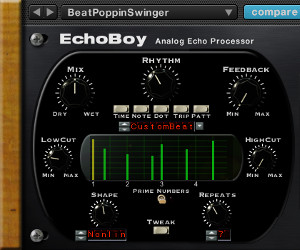
ECHOBOY is the flagship processor in the SoundToys family and doesn’t disappoint in its wide array of uses. This plug-in alone boasts over 30 different built-in echo styles with instant access to a wide variety of classic delay and echo boxes including EchoPlex, Space Echo, Memory Man, DM-2, and the TelRay oilcan delay.
Along with standard echo functions like Time, Feedback and Low/High Cut, EchoBoy boasts Tap Tempo, MIDI Sync, knob adjustments for groove and feel, and an adjustable saturation knob in the input section to give your echo effect an extra boost. The most remarkable thing about EchoBoy is simply how unique each of their delay styles sound and how strikingly similar they are to the hardware that they are meant to emulate.
Excellent examples of this are the rolled-off and warm Echoplex, creamy-smooth Space Echo and Tel Ray and the hi-fi sound of studio tape. For the technically inclined, Echoboy — along with a number of other plug-ins in this bundle — includes a few extras: i.e. a switch called Prime Numbers on the EchoBoy keeps the repeating echoes from building up resonance that often occurs when every repeat is at exactly the same time interval. This is a big help for engineers who’ve found themselves reaching for a post-FX EQ to alleviate some of the frequency build up from vocal or guitar echoes that resonate within the key of the song.
CRYSTALLIZER is a wild FX unit inspired by the Crystal Echoes presets in the Eventide H3000. Crystallizer does everything from off-the-wall harmonizing and octave treatment to backwards FX as well as more traditional chorus and reverb.
The main controls on the front face of Crystallizer include Input and Output, Dry/Wet Mix, Pitch, Splice, Delay, and Recycle. Pitch allows you to drastically raise and lower the pitch of the effected signal. The Splice control determines the length of the section of audio being sent to the unit that is captured and played back and at what speed it’s played back.
For example, according to the Crystallizer manual, if you set the Splice control to 1000ms it will be looking to grab a slice of audio every 1000ms and there will be approximately a 1000ms (1 second) delay before the effect sound is played back. Delay adjusts the amount of delay time added to the signal. Recycle is a kind of feedback control and allows you to send the output of the effect signal back into the input at varying amounts.
As with most of the SoundToys plug-ins, Crystallizer is much more easily digested with your ears than your eyes. More than anything else, you will need ample time to experiment when using Crystallizer to find the settings that work best for the given application. Settings for Drums, Echo (pitch and reverse), Guitar and Keys, Harmonizes, Melodic, and Spaced Out will help guide you quickly in a general direction.
FILTERFREAK is a resonant analog filter. Familiar controls for Mix, Frequency, and Resonance are joined by “Mod,” a control used to adjust the overall depth or amount of modulation applied to the filter’s frequency. Some of the excellent presets in FilterFreak include: Basic Filters and Modulation, Bass, Drum Destruction and Mangling, Envelope Filters, FX, Guitar, and Sweeps.
I tried FilterFreak as a wah-type sound on electric guitars. The results are as close as I’ve been able to come to an actual wah pedal in a plug-in and it has proven its worth a number of times on electric guitars and keys. In fact, I’ve gotten in the habit of recording these types of tracks in the studio dry knowing that I have the option of adding wah with FilterFreak later in mixing.
FilterFreak is not a subtle plug-in, but one that can be used across a wide variety of instruments to create a new sonic landscape that what was perhaps originally intended. FilterFreak tends to find its way into my mix sessions most often with artists that are looking for the mix engineer to add another level of creativity to the project musically as well as provide a sound mix.
PHASEMISTRESS is the mother of all analog phasers. Nearly every classic phaser imaginable was tested exhaustively in the design of the PhaseMistress and it shows. Controls for Mix, Frequency, Resonance, Mod and Rate are standard across the front along with input and output controls.
Like its counterparts in the Native Bundle, PhaseMistress boast a uniquely impressive sound and can be tweaked extensively to dial very specific settings. When I was messing with it, I managed to dial in the perfect Smashing Pumpkins-style phaser sound for an electric guitar. PhaseMistress is by far my favorite go to plug-in for all phaser needs be it guitars, keys, subtle or not so subtle drum FX and much more.
TREMOLATOR seems to me to be by far the best and most extensive Tremolo plug-in available. Controls for Depth, Groove, Accent and Rate provide all the necessary tools of the Tremolo sound. A wealth of excellent presets to choose from including emulations of the classics like Dan Electro, Demeter, Fender, Premier, SilverTone and Wurlitzer are also available to point you in a familiar direction.
Tremolator also morphs into a very cool auto-gate when the shape pulldown is switched to square wave. Engage the MIDI switch and you have an instant time-locked auto gate that can prove to be very handy on guitars, keys and other instruments. For guitars that need a little soul and keys that were cut totally dry, Tremolator is a life-saver and has become my go to plug-in for adding that little extra depth to my rhythm tracks.
SPEED is the AudioSuite- and Logic Pro Time Machine-compatible pitch and tempo modulation plug-in from SoundToys. You have the option of Simple, Graphical and Calculator modes to help you either stretch your audio or alter its pitch.
When I used Speed on delicate vocal and bass guitar tracks, it performed better than expected with very little destructive artifacting to the original signal even when the tempo or pitch were pulled down significantly. Like other SoundToys plug-ins, Speed is straightforward, but produces results you’d expect out of a more complex chain.
Last but certainly not least are the new additions to the SoundToys Native Effects bundle. The Decapitator and PanMan are welcome additions to an already impressive lineup of staple Pro Tools plug-ins for many engineers.
PANMAN is a rhythmic auto panner that bears more than a striking resemblance to the classic old PanScan found in the big classic recording studios. SoundToys jokes that PanMan serves all your panning needs that you didn’t know you had and they’re right. While an auto panner might not be first on anyone’s list of day-to-day plug-in necessities, the PanMan has some very handy features and functionality for which I found a number of uses. Keys, guitars and vocals, for example, can all benefit from the subtle tremolo-like effects of this ”set it and forget it”- style auto panning tool.
PanMan’s basic controls are: Offset, which allows you to focus the panning field to one side or the other in the stereo spectrum; Width, which adjusts the overall panning width; and Smoothing, which adjusts the edginess of the panning effect. One of the coolest forgotten features of the Panscan brought back to life in the PanMan is the trigger divider. This feature allows you to set the number of triggers it takes to move to the next pan position.
Of course the PanMan can be synced to MIDI and set very quickly to be precisely locked in with your session thus alleviating the need for tedious and time consuming Pro Tools pan automation. PanMan proved its worth on Rhodes and Wurly tracks in my album mix for Richard Jay and Jen Hallam’s children’s album series, People Rock!, as well as on some more driving synths for a soundtrack-type mix I recently finished for an artist called Robotmonkeyarm. I was able to very quickly dial in precise auto panning synced to the tempos of the tune.
The last and most interesting new addition to the Native Effects bundle is the DECAPITATOR. The Decapitator joins an elite group of successful analog saturation plug-ins such as the Mellowmuse SATV, Massey Tape Head and the URS Saturation that are helping prove that there is a real market for software that helps take the edge off of sterile digital recordings and brings back the warmth we all miss from our analog gear.
The guts of the Decapitator are 5 different hardware emulations highlighted by 5 buttons at the bottom of the plug-in labeled “A, E, N, T, P.” These buttons represent their models of: (A) Ampex’s 350 Tape Drive Pre Amp, (E) Chandler/EMI’s TG Channel, (N) Neve’s 1057 input channel, (T) Thermionic Culture’s Culture Vulture in Triode Setting and finally (P) The same Culture Vulture in Pentode setting.
The other main settings on the face are Drive, which is the overall saturation and drive setting, Output, Mix, controls for Low Cut, Overall Tone and High Cut, and a Punish button which engages an additional 20dB of gain for maximum pain. Two additional switches located on either side of the tone section are Thump and Steep. The user manual says that the Thump switch will add a few dB of low frequency boost right at the Low Cut frequency. This is similar to the ‘head bump’ of analog tape recorders, and is one of the reasons that recording to analog tape can sound so fat. Steep is a 30dB high cut filter that increases the amount of high cut based on the knob setting.
One of the best and most unique features of Decapitator is the auto output switch which smartly pairs the Drive and Output knobs so that if you increase the drive, the output knob will correspondingly decrease giving you a generally constant output volume regardless of how much drive you engage. Huge bonus points to SoundToys for coming up with this idea as it is generally very helpful and as of this writing I haven’t found a good reason to ever have it switched off.
In use on a mix for an artist named Jamie Lynn Hart, I found the rock vocal presets provided a generous amount of harmonic distortion and an overall bite to these female vocals that were originally tracked very clean and in desperate need of some edge sonically. Depending on the sound and instrument you are Decapitating, switching between each of the 5 main algorithms may or may not seem to change the sound a great deal. There are definite subtle differences between each of the hardware emulations, but in many cases it seems to take a lot of intense critical listening to distinguish between them.
In my tests on male background vocals singing simple “aahs,” these algorithims were much more distinguishable than on complex female vocals. The Neve emulation provided the most obvious difference between the 5 with more brightness and obvious distortion than the rest.
The tone shaping section of Decapitator helped me to add brightness to dull guitars and make overly bright vocals a little darker. Although this is not a feature I would expect from a saturation plug-in, I found myself reaching for the tone shaping section almost every time to see if making my vocals and guitars a little darker or brighter would help and often times it did.
The Chandler/EMI and Neve emulations added noticeable warmth and character to electric guitars that had come to me sounding a bit on the flat side. As with every other saturation plug-in I’ve had a chance to use, the key for me is to find a comfortable amount of saturation with the drive knob and then use the mix knob to blend this sound in tastefully with the original. I wasn’t able to find a suitable use for the additional 20dB of gain added with the Punish button on the couple projects I’ve been working on recently, but I have absolutely no doubt that this will be a favorite feature of other users.
TO BE CRITICAL: In general, I have very few criticisms of the Native Effects Bundle overall. I would like to see EchoBoy default to the mix knob being in the Wet position as this is generally an effect that is fed from an aux send in my mixes. It would also be very helpful to have a pop up label to more clearly distinguish the 5 hardware algorithms on the Decapitator from the “A, E, N, T, P” that they are labeled as now though I’m sure I’ll get used to that as I use this plug-in more and more.
Averaging just over $60 per plug-in, the SoundToys Native Effects bundle is by far one of the best value plug-in bundles you will find on the market.
Users of all skill levels can easily and quickly achieve tremendous results comparable to any of the top of line outboard gear available on the market for a fraction of the price of just one unit. Most surprising and impressive about SoundToys products is how they inspire me to find ways to improve on my tracks that I hadn’t even considered until I began experimenting.
Click to purchase SoundToys’ Native Bundle and visit www.soundtoys.com for more on SoundToys’ entire plug-in product line.
Zach McNees is a Brooklyn-based producer/engineer/mixer and live recordist who’s worked with Bjork, Rob Thomas, The Gregory Brothers, Pixies, Liars and Alice Cooper. Get in touch with Zach via www.zachmcnees.com.
Endless Analog Demos Its Dream-Come-True CLASP at Avatar
August 5, 2010 by Janice Brown
/* Filed under Tech & Reviews */
MIDTOWN MANHATTAN: Nashville-based producer/musician/inventor Chris Estes demonstrated his revolutionary Endless Analog CLASP system in Avatar’s Studio G on Monday. The session featured ace-of-bass and producer Jerry Barnes laying down some of his thick, low-end goodness to Pro Tools HD via 2” tape and the CLASP.
Since the CLASP is such a newfangled, first-of-its-kind product, there’s a lot to understand about what it does and how it works. There are several great reviews and testimonials on the system here and plenty of information to answer any and all questions you may have. But here’s the gist:
CLASP (Closed Loop Analog Signal Processor) consists of a hardware unit that is installed between your mic pre’s, DAW and tape machine (pictured), and the native Bridge plug-in (RTAS and VST), which you open on any track in your DAW session and use to control the tape transport.
These days, most recordings being done to tape are then dumped into the digital realm for editing and mixing. CLASP allows for a totally hybrid workflow, where analog recording and overdubs are done in real time, controlled with the speed and efficiency of digital, and all audio is stored in your DAW, minimizing tape usage. You can use one reel of tape to record an entire record, or several records for that matter.
CLASP essentially allows the tape machine to be used like a plug-in. You control the tape machine and switch between tape speeds stored in the CLASP right from your DAW. And you can monitor analog in repro mode. [See the CLASP connection diagram here.]
The elevator pitch to engineers via Endless Analog’s website: “CLASP provides sample accurate tape synchronization with zero latency analog monitoring while delivering a true analog front end recording solution for Pro Tools.”
Seeing the CLASP in action, its functionality seems instantly essential. It totally streamlines a process that needs streamlining and will allow so many more people to utilize analog tape as part of their production.
At Avatar, the CLASP hardware unit was connected via MIDI to the Pro Tools HD rig and through an Endless Analog proprietary cable to the 24-track Studer A800. Once the tape machine was aligned and synchronized to the Pro Tools session at both 15 ips and 30 ips recording speeds via CLASP, Barnes tracked a bass line and then monitored off the repro head to select his preferred speed.
During playback, Estes pointed out: “Being able to monitor in repro is a really great thing for getting drum sounds, for example, because you can make judgment calls about what tape speed you want to use for a particular song.”
“You can have it on whatever speed and then have the drummer play, mute his headphones, and then listen off the tape in Pro Tools. And you can make decisions about levels and EQ and things like that based on what you’re hearing.
“You can have the tape rolling while the drummer’s playing and, starting with the kick drum, you can bring the level up to find the sweet spot — right where we get just the right amount of tape compression — and dial it in so when you go to do your recordings, there are no surprises.”
CLASP stores information for up to three different recording speeds. Estes relayed to the group: “In a lot of sessions we’ve done so far, people will record the drums at 30 ips, then they’ll go back and re-cut the bass at 15. Then they’ll cut electric guitars at 7½, which sounds really great if the machine is aligned properly. With this [A800] machine, you’d vari-speed it down as far as you can get it and then do an alignment for that.”
“And if you wanted to use varispeed to overdub just a Tom Fill at 15IPS and have the rest at 30?” engineer Roy Hendrickson asked.
“You’d use the sync I/O in Pro Tools and vari-speed Pro Tools up,” says Estes. “So to make the toms sound bigger you’d vari-speed Pro Tools up and do the tom fill, put it back normal, and then the toms would be huge.”
Estes also points out you can daisy-chain up to three CLASP hardware interfaces and synchronize three 24-track tape machines for a total of 72-channels of recording. You can use CLASP with 24, 16, 8 or even 2-track machines, you can combine different machines and tape speeds for different tones. In addition to Pro Tools, CLASP also works with Nuendo and Cubase.
But there’s even more to know…here’s Estes on-the-spot rundown of CLASP’s main functions and features:
1) First of all, the CLASP is a precision measuring instrument, which functions as a sample-accurate synchronization device, so it’s able to profile the tape machine, analyze the ballistics of the machine, calculate to the sample what the latency of that machine is — taking into consideration the transport, the flutter, etc. Then, it’s telling Pro Tools to change the time stamp of the audio that’s coming into the converters.
So, while you’re recording, the meters are actually late but then when you watch the wave forms as they’re going down, Pro Tools is drawing them in relationship to the grid in the correct time. So it’s an actual time stamp, you can take the session to another studio and you don’t have to have the CLASP. You only use the CLASP when you’re cutting tracks.
2) The CLASP is seamlessly controlling the tape transport for you invisibly in the background. It works a lot like the Quick Punch mode — it looks at the track-arming status and as soon as you have tracks armed and you start the Pro Tools transport, the CLASP, analog machine and Pro Tools Quick Punch all start recording simultaneously in the background. It’s extrapolating from the Pro Tools transport and track-arming status. So even though you might have punched in late, you can peel back audio with tape now. Which is impossible otherwise.
3) You don’t have to rewind the tape until you reach the end of the reel. In this case, it’s counting down from 30 minutes (@15 IPS), so you’d only have to rewind every half-hour or so.
4) You now have latency-free analog monitoring. We’re monitoring here through the master-grade analog hardware of the CLASP, not Pro Tools.
5) CLASP compensates for the converter delay times. If you’re using Apogee 16X converters with Pro Tools, for example, that’s 62 samples of converter latency at 44.1, so you simply type in 62 samples in the offset and then everything you play is perfectly in time with where it’s supposed to be when you play it back.
After the demo at Avatar, engineer Roy Hendrickson shared his impressions with us:
“I think what Chris has done here is quite brilliant. The fact that he is getting Pro Tools to record these files into the DAW with an adjusted time stamp is genius.
“And once you’re finished using CLASP and you go back to using Pro Tools normally, there are no side effects, there’s nothing you have to change about your workflow. You don’t have to move your files and it does all those little tweaks that you’d normally have to do — like re-compensating for things like delay manually — this takes care of all that for you in a really elegant manner so you don’t have to worry. You can concentrate on the performance.”
On the Endless Analog website, Chris Estes and Endless Analog VP Amy Becker Estes ask us to: “Imagine experiencing analog tape recording as fast, effortless and timesaving as Pro Tools.” The CLASP system, which Estes started developing out of his garage in Nashville over five years ago, makes this idea – once Estes’ daydream – a reality.
Endless Analog’s CLASP system is available now from Vintage King for $7,495.
Visit www.endlessanalog.com and www.vintageking.com/Endless-Analog-Clasp for more information!