Best of CES: The Super Short List
January 9, 2011 by Walt Ribeiro
LAS VEGAS: The 2011 CES Expo in Las Vegas had no shortage of state of the art speakers, pre-amps, and gadgets.
The products featured here hope to make their way into the NYC Audio and Video world. Behind all of the cars, electronics, speakers, and more, there were two items that really stood out to us as being of Buzzworthy in the world of SonicScoop:
WOWee Portable Speaker –
Most speakers deliver mid and high frequencies, but have no low end. Enter, The WOWee Portable speaker. The people at WOWee created a hand sized speaker that uses the table, or platform it sits on as the vehicle for its bass frequencies. It plugs into your iPhone, iPad, iPod, MP3 player, or computer, and at just $80 is a good alternative to other options. Checking your mixes on the move just got easier.
ISOMIKE –
Imagine recording audio with no limiting, no compression, no mixing, and no equalization. That’s what you get with the ISOMIKE, (Isolated Microphones) an experimental acoustic baffle system that addresses the interference of intrachannel sounds that results in compromised fidelity. Visit this page and scroll down for more details of it the system in practice.
The brainchild of Ray Kimber, founder of Kimber Kables, this unique recording system records in DSD and plays back in CD, SACD, and more (listening sessions were held throughout CES). It results in audio of the highest quality, and extremely realistic. We wouldn’t be surprised to see major NYC venues and orchestra halls taking advantage of this over time. The sampler CD alone amazed us — we can’t wait to see what else is in store for ISOMIKE.
A Blue Mic For Your iPhone
January 4, 2011 by Janice Brown
Blue Microphones has put out the second generation of Mikey ($99 list), a stereo condenser mic built solely for the iPod and iPhone.
With the ability to record 44.1kHz/16bit audio to your Apple device with its dual cardioid condenser capsules, Mikey is a high-quality device for field recording, interviews, lectures, or getting some song ideas recorded with minimal fuss.
The newest generation features new circuitry for better recording quality, a mini USB port that allows you to charge your iPod during recording, and a 3.5mm stereo input jack which allows you to record audio from another device.
Mikey rotates 230 degrees and has seven different locking positions, as well as a three-way sensitivity switch to select the appropriate gain setting for your source.
While the Mikey can be used without additional software, Blue has a free recording app called BlueFiRe, which allows you to record at full CD quality and functions with the iPod rightside up or upside down, depending on how the mic is positioned.
Paired with Primacoustic’s Telepad ($29 street, pictured below), Blue’s iPod mic makes it easy to sketch out some audio ideas with minimal setup required. While Mikey is only compatible with iPod and iPhone 3G and earlier, Blue is feverishly working for functionality with the newest models of Apple products, including functionality with the iPad. For multiple audio clips and examples click here.
-Mike Bauer
This piece originally ran on Delicious Audio, The Deli Magazine’s pro audio blog.
The SonicScoop Year in Review: Top NYC Music Business News and Trends of 2010
December 29, 2010 by David Weiss
THE FIVE BOROUGHS: 2010 has been busy all right. For anyone involved in New York City’s expansive business of music – producer, publisher, entrepreneur, engineer, artist, and many more – the environment remains fast-paced, ultra-competitive and constantly changing.
With 2011 looming, SonicScoop looked for the news, trends and topics that stood out to us over the past 365 days.
In audio post, it was grow or die in the uppermost echelon. The biggest facilities, including hsr|ny, Nutmeg, and Sound Lounge made serious expansions into audio and/or video:
Sound Lounge opened an ADR Stage and multiple studios.
Nutmeg Post added a strong team and facility when it soaked up Soundhound.
The big post house Mega Playground built out audio capabilities.
Northern Lights added a 5.1 audio mixing suite.
Video house Click3X reversed the trend and added their own audio suite.
Large and mid-sized recording/tracking/mixing studios kept making capital improvements and expanding:
Premier Studios took over the 8th floor at 723 7th Avenue.
Engine Room opened up its penthouse studio.
Stadium Red expanded with a new studio for Just Blaze and a mastering suite.
Platinum Studios added Augspurgers to Studio K.
Sear Sound set up the Moog-centric Studio D.
Tainted Blue swapped out its SSL for a Euphonix (nee Avid) System 5.
And props to Electric Lady for marking its 40th Anniversary.
Converse (yes, the shoe company) has an interesting business plan for the Rubber Tracks studio it’s going to open in Williamsburg in 2011: no-cost recording.
Advanced smaller studios – independent and within larger facilities — and producer rooms also opened up at a peppy pace:
Chris Theberge’s Music Works arrived on the Upper West Side.
The former One Point Six in Williamsburg was reborn as Three Egg Studios.
Manhattan Center Studios launched The Fuse Box with Public Enemy’s Brian Hardgroove.
Avatar opened up its Studio W writing room.
Sisko’s Min-Max Studios opened up in midtown.
Guitarist Justin King moved his Vinegar Hill Sound from Portland, OR to DUMBO, Brooklyn.
Avid capped off a furious year of reinvention and new products with the release of Pro Tools 9.
Music houses and composers still had a ton of TV, film and video game work to go after and win:
Joel Beckerman of Man Made Music continued to make NYC a TV music powerhouse.
Composer Peter Nashel turned ears everywhere with his work for shows like Rubicon.
Outfits like Expansion Team scored for networks such as the Biography Channel.
Tom Salta understands how to get chosen to score for games like Prince of Persia and Red Steel 2.
Production music and synch licensing remained a solid business, especially for those who got in at the right time or had a smart approach.
NYC’s Kingsize Music was acquired by 615 Music.
And later on Warner-Chappell (NYC) bought up 615 Music.
NYC’s Videohelper released the “Scenarios” music search tool.
Jingle Punks continued to grow.
Mechanical licensing experts RightsFlow kept progressing.
One of NYC’s most controversial music business plays, peer-to-peer file sharing network Limewire, appeared to be finally finished.
Tracking, mixing and mastering at NYC’s established facilities did a relatively healthy volume of A-level and independent work throughout the year:
The Black Eyed Peas, Rivers Cuomo and Kanye West were at Germano Studios.
Neon Indian, Beach House, Matt and Kim, Bear Hands and more were mastered at The Lodge.
MSR Studios handled Kid Cudi, Evanescence and Broadway Cast recordings.
Lenny Kravitz, The Dirty Pearls, “Glee”, and Vampire Weekend were all at Avatar.
Joe Lambert Mastering worked with Moby and Ninjasonik.
New software and hardware happiness abounded:
Propellerhead released Reason 5.
NYC suffered losses when beloved people and places left us:
Recording icon Walter Sear passed away.
The great hip hop/jazz experimentalist Guru was gone before his time.
Clinton Recording Studios hosted its last session.
Brick and mortar music retail took another hit when Fat Beats shuttered its last stores.
Baseline Studios, home of Just Blaze and countless Jay-Z hits, closed.
Chung King Studios started off 2010 with a bang by suddenly vacating Varick Street.
NYC-based producers, mixers, engineers and artists became businesses in their own right:
People like Allen Farmelo developed their distinctive sound.
Choice songwriter Claude Kelly made a business of hits.
Shane Stoneback’s career took off via work with Sleigh Bells and Vampire Weekend.
Mixer Mark Saunders embraced multiple aspects of the biz from his studio at Beat 360.
Dream Theater’s Jordan Rudess took his iPad/iPhone app MorphWiz all the way to #1.
The studio scene got a lot more socialicious and FUN:

Two fiesta types plus (r) introspective Stadiumred artist Jeremy Carr. SonicScoop says: HAVE FUN AND PROSPER IN 2011!
Digital Music NY was one of many popular business-based meetups.
Stadium Red partied down post-CMJ.
20dot20 mixed advertising and music.
And the Connectors connected a LOT of people.
What big stories would you include? And what do you see next in 2011? Don’t be shy – leave a comment and let us know!
– Janice Brown and David Weiss
AmpliTube 2 for iPad Now Available on iTunes Store, iKlip Mic Stand Adapter Now Shipping
December 26, 2010 by David Weiss
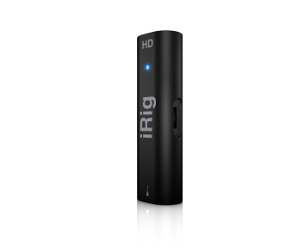
IK Multimedia has announced that AmpliTube 2 for iPad is now available on at the iTunes store. Previous users of the play/practice/record solution — in conjunction with the iRig adapter — can update their AmpliTube for iPad now for free, while new users can download the full version of AmpliTube 2 for iPad for $19.99/EUR 15.99, or get AmpliTube for iPad free today.
AmpliTube 2 for iPad includes:
Better sound
– Improved sound with DSP parts derived from AmpliTube 3 and T-RackS 3 for Mac/PC (free update)
Practicing tool
– SpeedTrainer to slow down/speed up (50%-200%) imported songs without affecting the pitch to easily learn complex riffs or improve skills (free update)
– Import songs as backing tracks directly from your iPod library on your device or your computer using file sharing or Wi-Fi (free update)
– Up to 50 songs can now be imported (free update)
– New preset naming feature (free update)
Complete recording and production studio
– Built-in single track recorder with re-amping capabilities (free update)
– Multi-track recorder with 8 tracks and master FX section with 5 effects (Reverb, Chorus, Delay, Compressor & Parametric EQ) – 2 send effects per channel and 2 master effects (available as in-app purchase for $14.99/EUR 11.99)
– Export recordings and mixes as high quality audio files or send them by email as MP3s (free update)
New effects for guitar, bass, vocal or any other instrument
– Compressor
– Graphic EQ
– Parametric EQ
– Reverb
– Limiter
(Available as in-app purchase: $2.99/ EUR 2.39 each)
In addition, iKlip, the universal iPad® mic stand adapter, is now shipping.
iKlip is a universal microphone stand adapter that securely supports the iPad on virtually any microphone stand.
– Multi-angle adjustment allows precise positioning for optimal stage or studio viewing
– Provides both landscape and portrait orientation of the iPad
– All iPad controls, buttons and connectors are accessible
– Can be mounted on the vertical stand or the horizontal boom
iKlip is available for $39.99/ EUR 29.99 MSRP (exc. taxes).
AmpliTube 2 for iPad Out Now: More Gear, Better Sound and 8-Track Recording
December 23, 2010 by Janice Brown
Just in time for Christmas, IK Multimedia has released Version 2 of its AmpliTube for iPad app.
AmpliTube 2 has been designed to streamline and enhance the mobile guitar and bass playing experience — from the creation and naming of the guitar signal chain tone presets to importing, recording and exporting audio.
Users can combine AmpliTube with iRig, IK Multimedia’s instrument interface adapter, plug their guitar into their iPhone/iPod Touch/iPad to access AmpliTube guitar and bass tones, and now with v2 — record their performances with the new built-in recorder. See demo video below.
AmpliTube 2 feature highlights include:
- 5 new stomp effects (available as in-app purchase): Compressor, Graphic EQ, Parametric EQ, Reverb and Limiter
- Improved sound with DSP parts derived from AmpliTube 3 and T-RackS 3 for Mac/PC Apps
- Built-in single track recorder with re-amping capabilities
- Multi-track recorder with 8 tracks and master FX section with 5 effects (Reverb, Chorus, Delay, Compressor & Parametric EQ (available as in-app purchase)
- 2 send effects per channel (selectable between reverb, delay, chorus) and 2 master effects (3 band parametric equalizer and compressor) in the master section
- Export your recordings and mixes as high quality audio files or send them by email as MP3s
- Import songs as backing tracks directly from your iPod library on your device or your computer using file sharing or Wi-Fi
- SpeedTrainer for slow down/speed up imported songs without affecting the pitch. Great for learning complex riffs or working on technical skills
- Up to 50 songs can now be imported
And more!
AmpliTube for iPad 2 is now available from the iTunes store for $19.99. Pick up an iRig via IK Multimedia for $39.99.
How to Make a Best-Selling iPhone and iPad App: Jordan Rudess & the Creation of MorphWiz
December 21, 2010 by David Weiss
MIDTOWN, MANHATTAN: As if becoming a master of your craft weren’t challenging enough, now in the world of apps we must invent entirely new crafts to master.
Not surprisingly, Jordan Rudess, virtuoso mad-science keyboardist of cornerstone NY prog-rockers Dream Theater, is always up for just such a task. To that end, he’s created an ongoing series of music/media apps for the iPhone and iPad, each one more successful than the last.
With his latest effort, the mind-bending MorphWiz, he’s set a standard he may meet but never beat – it was a #1 seller on iTunes and has taken in a load of awards since then, including Billboard’s “Best Music Creation App”. Inspired by Rudess’ experience with helping to design the Haken Continuum Fingerboard MIDI instrument, MorphWiz ($9.99) is a vertical-grid-based musical instrument that allows a great deal of expressive control with real-time, highly organic, animated visual feedback.
As creative and intuitive as it is to use, however, pulling MorphWiz together was an arduous task – as the construction of most quality apps are. In this interview, Rudess took the time to break down the A-Z of how an app is born, from inspiration to conception, partnership to programming, marketing plan to a place on the iTunes store. To learn how to get your own iPhone/iPad app together, just read on.
What first got you thinking about creating iPhone apps?
Well, the light really came on as soon I realized that music was possible on the iPhone. It was one of the original piano apps I saw a couple of years ago that sparked my imagination – I just touched a key on the iPhone, it made a sound and I thought, “This is cool.”
From there, what made you go from enjoying other people’s iPhone apps to thinking you needed to create one of your own?
The iPhone world is something that exploded rather quickly, and when it became clear that you could do creative things with it, a lot started happening. I was very much on top of all the developments, I started to realize the full potential of the device and it got my mind somewhat soaring.
I started to think of a lot of creative ideas, and I reached out to some of the people doing the coolest things in the iPhone world. One company was Amidio, based in Moscow, so I reached out to them and they were interested in working with me. Funny enough, I had a trip to Russia planned with Dream Theater, so I met with their programmer Toyo Bunko, and he and I made plans to release an app which ended up being called JR Hexatone.
JR Hexatone is an app that was really a sound-sequencing app, which lent itself very much towards the whole electronica/glitchy type of movement. That came out in 2009, and was really the beginning of apps that had my name associated with it.
From there, one of the popular apps that I worked on is Bebot, which is a vertical controller in some ways similar to MorphWiz where the note is spread across the screen in vertical lines. That kind of control is something I’ve been interested in for quite a long time, and also because of my Continuum designed by Lippold Haken.
Somewhere along the line I discovered an app that was called 4D Synth, and that inspired me too. I wrote a letter to the guy who programmed it, Kevin Chartier, that started a conversation, and we decided we wanted to work together to write a brand new app that really demonstrated my vision.
Sounds like it pays to keep your eyes open, and find people who have a track record. After you connected with Kevin, what guided you to the exact type of app you would produce first?
A primary thing about MorphWiz was that it would have this kind of Bebot/Continuum note grid and vertical line control design, where each line had the ability to have some expression on them. But beyond that I wanted to have an instrument that was a combination of visual and audio. It’s been my desire to bring together the world of audio and video as one. I think they are one, and this app technology allows us to have as little separation as possible.
Kevin and I worked very hard on merging these two worlds, and we came up with MorphWiz. The idea was, “How could we morph from one sound to another, and also morph from one image to another, and have them really correspond?” The basic waveforms of MorphWiz are sine, triangle, sawtooth and square, so we gave each waveform a visual image, then experimented with how we would not only morph audio but the visuals. So when you put your hand on the playing surface of MorphWiz, you can have the waveforms morph from one to another and at the same time get a visual representation of what they’re doing.
Although MorphWiz only shows you a visual representation of the last note you hit, sonically it’s morphing every note you play independently. That’s the very deep foundation of the program – too deep for most people to even realize what’s happening. On a traditional synth, for example, if you’re bending one note, you’re going to bend them all. But with MorphWiz the idea is that every note is an independent voice and each note can be expressed on its own, in that you could play three notes, bend one and not the other, bend one up and the other down…things like that in real time.
Sounds like it helps to be ambidextrous!
Sure. You can play two notes at the same time, bending one in with one finger, and bending the other while the first is fading out.
So once you have an app concept, what kind of team and resources are actually needed to design it and test it?
That’s a good question. My company is very, very small – it basically stared out as two people. One of us is a professional programmer/musician/music lover, and the other is a professional musician — that’s me – who’s very interested in technology, controllers, and different ways to make sound and visuals. We’ve found ours is a great combination to bring apps to the world because we can successfully conceive of them, make them and then market them.
In MorphWiz’s case, I have a musical career and people know me as someone who plays a lot of interesting sound-controlling devices. That along with my other complementary careers presenting technology, educating – all of that combined with Kevin’s immense programming skills make this work.
But there’s a lot of ways people can make this work. A lot of companies have people that they can assign the tasks more easily among them so that one person does coding, the other does marketing, and the does the demo, etc… Our organization is very small, but between us we have the parameters that we need.
As far as funding is concerned, in a lot of companies someone will come up with an app, and then need money to hire a programmer from the outside to make it happen. In our case, it was a work of passion: This was something we wanted to do, and make this vision happen. Kevin has a full-time job working for the government, and every spare minute he’d program. I have my full time job working with Dream Theater as a musician, and in my spare time I’d be talking with Kevin, conceptualizing, testing, playing it, and after it’s out calling the media for interviews and going to conventions.
The reason we didn’t need any funding in the beginning was that we were almost possessed with the joy of what we were creating. So either this thing will proceed to the next level and we’ll keep having fun with it, or we’ll get funding and it will expand that way.
Can you give us a deeper look at the workflow between creative and programming – or you and Kevin, in this case?
I generally have a fairly strong vision of what I want, and as soon as I present something to Kevin, he’s generally right there with me. Kevin is not just a programmer – he loves music and graphics, and we’d have a great time online when we’d pick the visuals to represent the waveforms. We’d look at something and say, “Maybe those colors aren’t rich enough. Can you make it a little more angular? A little more opaque?” Once there’s something on the screen to look at, then we can make changes from there.
After that, how is an app actually brought to market/onto the iTunes store?
From my experience, it seemed very complicated putting things into the store. We had to make these special builds, type in a lot of information, get very accurate descriptions together, put up special graphics, make a Website, put it up on Facebook, and make sure all the bases are covered.
It’s not that easy. Apple requires you to have a full support system in place – you even need to make a video. There’s a lot of required elements that go into making the app. It takes a lot of patience. MorphWiz from start to finish was about a nine-month ordeal.
Don’t try to market your app without the assistance of YouTube!
Apparently it was worth it: Morphwhiz went to #1 on the iTunes store within a few days of its release. What do you think allowed you to attain such quick success?
Well, two things, one of which is that I think it’s a really together app. It’s an app that’s very fun for young people to play because it looks really colorful and it’s playful. There’s a lot of different patches, they all look different, and it’s a really good time. But even for a pro musician, it offers some very unique features that you just don’t find on any other instrument. So we had an app that captured all ages, all different levels, and different interests in music.
Of course, it can happen that the product is amazing and no one even knows about it. But we were very aggressive about making sure the world knew about it, contacting all the music press, putting it up onstage with Dream Theater, talking about it in every interview. It all keeps things in motion.
Six months later after MorphWiz came out, what would you identify as the challenges and rewards of creating an app? What’s easy about it, and what’s proven tougher than you expected?
There’s a lot of upkeep. If you want your app to continue to be successful, then you have to work it. I go to shows like the San Francisco MusicTech Summit, before that I was at the San Francisco App Show, and prior to that I was at the Billboard Awards where it was voted the #1 Music Creation App. I play it whenever I can in public, and I just think it’s the kind of app that can be around for a long time.
We get to upgrade it as well, and we have some cool upgrade paths for MorphWiz to go down. Just to make sure it remains vital is a big job. That’s maybe the tough part – to keep the business running and not lose the momentum.
The rewarding part is that once you do all the work, get it submitted, it’s good, and people know about it, then people buy it and enjoy it. That part’s cool.
That sounds very cool! So in short, what advice would you give to people reading this who may be thinking about their first app?
Good luck! (laughs) If it’s a music app then you have to make sure that it’s going to really sound good. I tell people, “Make sure it sounds good and looks good, even if it’s really simple.” It’s fine if it can only do one thing, but it has to be quality. If its buggy that would be a problem, but if it does what it says it does, and is entertaining/fun/useful, that’s all you need.
I would also say that there’s two level of apps, in the sense you can make something very deep, complex and powerful, or you can make something that’s very straight-ahead, and that’s OK as well. A good example of how one thing can lead to another is my newest app, SketchWiz. It’s not a music app, but it’s something that stemmed out of developing MorphWiz – it’s caught on and become a big thing in the photography area.
Ready for a Scoop? We have an app that we’re releasing at NAMM called MorphWiz MIDI. It’s a MorphWiz engine that can run any MIDI synth.
That’s juicy! Listening, everybody? Shifting gears, do you think NYC is a particularly good breeding ground for app developers, in your opinion?
Well, I don’t know. I’m from NYC, but my partner’s from Florida. I know that there’s a lot of very creative people in NYC, and programmers from NYU with a great technology education. NYC has always been a hub of creativity and technology, as well, just like San Francisco or L.A.
I’m watching the world come into the whole app thing, like Korg, which is doing some stuff now that’s kind of cool. I’m just very aware of these bigger organizations that are trying to play this game, like ReBirth coming out for the iPhone and iPad. It’s about to become a whole different animal where big companies take over. But at the same time, you have a lot of seeds coming out of New York.
On the other hand, you’ve teamed up with programmers from Moscow to Florida. When it comes to the app world, it seems like it doesn’t matter where anybody is located, as long everyone’s on the same page.
Absolutely, I didn’t even meet Kevin in person until we were six months into the project. We did everything over Skype, phone, and email. It all worked out, and we met after we submitted the app — it’s a new world out there.
– David Weiss
Moog Launches Filtatron App for iPhone / iPod Touch
October 18, 2010 by Janice Brown
Today, Moog Music launches its new Filtatron app, a real-time audio effects suite and studio tool for your iPhone or iPod Touch. Richard Devine demos below…
According to the Filtatron product page….The heart of the Filtatron is a four-pole resonant Moog Ladder Filter, digitally modelled to approximate the warmth and character of Moog’s analog hardware. Use it to shape the sounds supplied by the on-board oscillator, sampler and line input.
The Pads are an intuitive performance interface giving you hands-on control of all the major Filtatron parameters. Use each pad to control two parameters at once. Sweeten your sounds with the FX module, including a Delay that can be modulated by its own LFO. Delay time is smoothly interpolated for analog-style delay time tweaks. Use the Amp controls for tones ranging from warm analog distortion to extreme clipping.
Explore the array of included loopable samples or use the Sampler to record and play your own unique sounds. You can easily move audio files back and forth between the Filtatron and your computer and Audio Copy and Audio Paste allows you to share sounds with other compatible apps.
The Filtatron also comes loaded with presets that kick-start your sound. They run the gamut from cutting rhythms to ambient drones to out-there effects workouts. Use the built-in Email function to send your Filtatron presets to your friends and bandmates.
Learn all about the Filtatron with the detailed User Guide. Also included is a handy Glossary of electronic music terminology that will greatly enhance your understanding of the Filtatron and electronic music in general. Buy the app at iTunes!
Aura Flux Ambient Music App Now at App Store
October 4, 2010 by David Weiss
iPhone and iPod Touch software specialists Hige Five have announced the availability of Aura Flux on the App Store.
An auto-generative ambient music App for iOS devices, Aura Flux ($1.99) is an interactive ambient music maker that uses intuitive graphics to create complex, evolving melodies with a few taps of the touchscreen.
Non-grid based, Aura Flux is like an interactive dot-to-dot experience, where each picture created generates an individual and totally unique soundscape — moving objects in space dictates the sounds that are produced.
Aura Flux has 48 Instruments, and four Seasons (keys) to choose from, along with a constantly evolving background ambience. Chains of notes are created quickly and easily by visually connecting nodes using the multi-touch interface. These nodes can be customized by setting the pitch, trigger rate, volume, decay and adding additional ‘chord’ notes. By layering these chain reactions together the user can easily produce lush sounding ambient melodies. With the option to randomize many of the settings can introduce elements of generative music into their creations.
The keys are locked to certain intervals so that it is impossible to create harsh dissonance or unpleasant-sounding harmonies – users can choose from a range of these keys (or ‘Seasons’) ranging from Mixolydian to more minor sounding modes, which vastly change the character of the piece. To complement the melodies being produced by the interacting nodes, there are a number of background ambience pads that serve to knit together a more coherent piece.
“For the most part Aura Flux is about building visual structures made up of connected nodes that interact with each other to create music,” says Aura Flux designer David Newman. “Once you have a structure in place, you can sit back and listen or get in there and tweak to hear the subtle differences. The way in which the nodes are connected and their individual settings contribute to the way the sounds are played back and often small tweaks can result in big changes in sound. The result is a constantly evolving soundscape with rhythms that come and in out of play – in a way that’s vaguely reminiscent of the music of Steve Reich, Philip Glass or Steve Hillage.”
Aura Flux Key Features:
48 High quality stereo instruments
14 Stereo background ambience sounds
4 Seasons (keys)
Unlimited generative music
Full save and load of scenes
Multitouch playback of instruments
Universal App – one purchase for iPhone/iPod Touch and iPad
Supports multitasking on iOS4
Volume, Trigger Rate, Pitch, Additional Note, Pulse Speed and Decay settings for each node
Solo each node
Instrument preview
Under 8Mb
Sonnox Launches iPhone Tutorial App
May 12, 2010 by David Weiss
Sonnox Oxford Plug-ins users can now view demos and tutorials directly on their iPhone with the release of a new Sonnox iPhone App.
Tutorial videos on the entire range of Oxford Plug-ins are available, plus an informative collection of demos by such top producer/mixers as Fab Dupont, Nils Hahman and many others, sharing their pro mixing tips and tricks.
The Sonnox App also features user stories, from a host of successful professionals who use Oxford plug-ins daily in their work, whether music recording or mixing, and in both live and post applications.