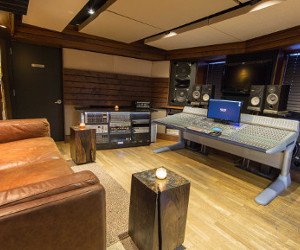
Summing Up: Quad Launches Studio Q1
July 27, 2011 by David Weiss
/* Filed under NYC Spotlight, SPARS Feed */
MIDTOWN, MANHATTAN: Blink, and you might miss it. The action in the NYC studio scene right now is raging fast and furious, with noteworthy new rooms opening up at a pace almost too fast to keep track of.
The latest big-time addition to the cityscape: Q1 at Quad Recording Studios. The flagship revision to this storied facility, Q1 represents the latest evolution in NYC’s world-class studio offerings for artists, producers, mixers, and songwriters in search of new creative options and inspiring surroundings.
With its arrival, the fascinating timeline of 723 7th Avenue gets yet another update. The seeds of this new room were sown in Quad’s 2010 sale of its 8th floor — emerging lean and mean, Quad President Ricky Hosn and his staff embarked on a $500,000 overhaul of its remaining territory, the 3500 sq. ft. 10th floor.
Ask Hosn about the current NYC studio climate, and he’ll readily admit that navigating the scene is more challenging than ever. “It’s kept us on our toes,” he says, “and restructuring the place was essential for us. Quad was five floors at one point, but the market won’t sustain that anymore. We had to reinvent ourselves, to move in step with a changing of the times — we feel we have the right formula now.”
Making the Update
The results of the remake are as easy to see as they are to hear. Visitors step off of the elevator directly into the atmospheric Qlounge, complete with a pool table, bar and a carnivorous fish tank (show up for feeding time – if you dare). Those familiar with the powerful audio pod previously known as Studio D – now Q2 – will be happy to know that that room remains intact, although it is equipped with a new lounge that flanks it to the left.
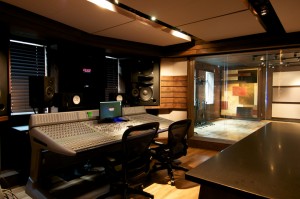
Also with a brand new lounge is the latest addition Q1, a space designed to make all kinds of waves. At 320 sq. ft., the comfortable Larry Swist-designed control room may seem slightly compact, but once the advanced functionality and exhilaratingly loud and accurate acoustics have been experienced, size no longer matters.
To the contrary, Q1 is already making a big impact with its extreme flexibility, both in workflow and capabilities. “In the past a studio would have a mix room, a production room, a tracking room,” Hosn explains. “We said, ‘Let’s put all three together, and make a room where any producer, engineer or artist can walk in and feel at home.
“That’s the approach we took. There’s a producer’s desk in the back where you can sit, listen accurately, and work. The producer or artist is never sitting too far from the controls and the engineer. It’s geared around the artist and production, and that’s the trend we see: A lot of producers are handling the whole project, and we built it around that reality. It’s the same principle we had with creating Studio D five years ago, but we made this a bigger format, with better gear and a much bigger live room, so you really can handle any kind of music project.”
Outfitted with oiled walnut wood appointments, Swist’s pleasing design employs generous views to the outside and the adjacent control room, providing Q1’s users with an expansive experience while they work. “Windows were essential: You’re in Times Square so take advantage of it,” Hosn says. “Both the live room and control room have windows out to Times Square, and the window between the live and control room is bigger than most windows in the city. You feel like you’re right next to the artist — it just feels like one big room between the control and live room.”
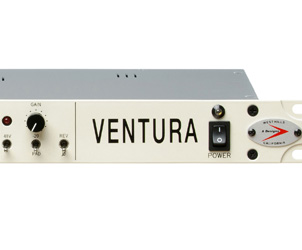
Once clients get settled into the welcoming environment, things get increasingly interesting. While the ICON control surface won’t raise any eyebrows, the Pro Tools HD 4 Accel 9.0 system is to be expected, and the comprehensive list of plugins is de rigueur, where the signal can flow from there is unique: three different summing mixers – a Chandler 16 x 2, SSL X Logic 16 Channel, and a Manley 16 x 2 Custom mic/line – flanked by a who’s who of outboard gear.
“We had the opportunity to go with a typical analog desk, but we said, ‘Let’s do something different and get creative with the equipment,’” Hosn says. “We focused on summing, with three summing mixers to give the engineer more of a choice for the sound. This is the best of the summing world: Chandler comes from the old EMI consoles, SSL is the industry standard, and we have something different in the Manley mixer, which is amazing on vocals. As far as outboard gear, we went for — not vintage, but brand new — Chandler, GML, SSL, Manley EQ/compressor, and of course the Universal Audio units like the 1176 and LA-2A.”
For monitoring, a pair of Augspurger Dual 15” main monitors, custom built by Professional Audio Design, supplemented with 2 subwoofers, throws down the gauntlet for mega volume listening in NYC. In a recent visit listening to hip hop, pop and rock through these speakers in the tight, well-tuned room was a sonically exciting experience, revealing extremely high levels of full-frequency detail cleanly across the stereo field. For those who need to craft, check or just feel their mixes at massive SPL’s, Q1 may well become a mandatory stop on the way to the mastering lab.
Design Assignment
According to Swist, whose credits include Tainted Blue, Premier’s Studio E, Eastman School of Music, SUNY Fredonia, and The Lodge, the directive for Q1 was to create a warm but contemporary look and feel. “We used a lot of sharp lines, and the sound has got to be there — the acoustics need to be spot-on because people are going to mix in there,” Swist notes. “The challenge today in an NYC facility is that you don’t have the cubic footage you used to, so you have to spend more time in the design phase ensuring that the room will translate in the outside world, especially with bass response. It also has to have a broad sweet spot. It’s easy to make it work right in the middle, but to make the room work for the producer standing next to you or in the back is a challenge.
“Most live rooms have an idiosyncratic quality to them: The great engineers find its good characteristics, the right places for the drums and mics, and use gobos,” Swist continues. “My approach is to keep it a relatively active room, and then you can come down from there. So Q1’s tracking room sits in a relatively live place: It’s good for drums, but reverb times can be cut down with gobos and more acoustical absorption. I think the live room is larger than most. It’s not huge, but then again most people are just putting in booths in a production suite today. This offers the ability to actually track a band. A lot of those rooms are going away, and this fills that void.
“Overall, the studio is something fresh, and you do have a really good initial emotional reaction to it. It’s positive creatively, and that’s what we were striving for. It’s like, ‘Wow, it feels nice and it sounds nice. We have a good combination there.’”
Under the Hood
Cleanly integrating Q1’s three analog summing mixers and outboard gear with the ICON was no plug ‘n’ play operation. “We wanted to do something focused on an easier workflow, quick mix recalls for engineers and easy accessibility for producers,” states Alessio Casalini Operations Manager and Chief Tech for Quad Studios NYC/Halo Records. “This improves the possibility to change little things fast and maintain top quality in terms of outboard gear and technical components like patchbays, wires, and connectors.
“The wiring of the whole studio and the patchbay’s layout were designed by Glenn Baughmann and myself,” continues Casalini. “We brainstormed in order to find the best result to yield a simple layout, one noted example being: The three summing mixers normalled to the multitrack outs, and the outs of those mixers normalled to the Stereo inputs of the (ICON) XMon (monitoring controller), and dedicated computer output to the XMon. Even the TV is on the bays.
“We started with the best quality wires and connectors, and used only two DB25 patchbays for connections with XMon and audio interfaces. All the other patchbays are soldered by hand and split to DL connectors panels.”
Connectivity in Q1 is obsessive: Every wallplate in the live room, control room and in the lounge are equipped with SpeakON plugs, Ethernet, instrument, MIDI, and BNC. “The goal being,” says Casalini, “to give the engineer every possibility, without trying to find a way around what he has in mind. In this scenario the artist, producer, and/or engineer will have everything accessible in the clearest way possible.
“New York City studios are looking to the future, and retaining our experience from the past. We expect that our careful planning yielded a room ninety percent ready for anything — with the client left only to decide the direction of the last ten percent.”
In Action
Online since June, Quad has quickly been breaking in Q1. Sessions include Engineer/Producer Andros Rodriguez (Shakira, Oh Land), Music Producer Rico Beats (Justin Bieber, Niki Manaj), and Universal Music Artist Stephen Marley. One frequent visitor has been the NYC engineer Stuart White (Alicia Keys, K’Naan), who’s gotten to know the room via mix sessions for the artists Borni, Fumibella, and Sunny.
“The mains are really smooth,” he says. “They sound good and balanced. The ProAc monitors I use a lot and they’re dialed in, very smooth on the top end. Having three different summing boxes gives you three different colors. The Chandler is really punchy, with a lot of transformers in it: It’s got color to it, with some punch when you drive it hard. I typically use that summing bus. The Manley is all tubes, which provides a fat tubey sound, and the SSL is a different color.”
According to Stu, Q1 met Quad’s objectives in smoothing out the NYC studio continuum. “I think in a lot of ways Q1 is bridging the gap between the old-style, large-format console style way of working and the new summing bus-style way,” Stu adds. “There’s not a large format console, but still a plethora of analog gear so you can mix with the speed of what we need today. You have clients that expect you to mix in the box for speed, but at the same time Q1 makes you and the analog purists happy by being able to sum in analog gear.
“I think it’s a new breed of room in that sense. A few years ago, most engineers didn’t want to mix on an ICON, they wanted a large format board. But Tony Maserati is working exactly this way, and he’s the one who kind of inspired me to do it: You’re mixing with faders, and tactile controls, so you can stay creative and not use the mouse so much. But if someone wants to come in and change the song, it’s very easy to pull your mixes back up. It bridges the gap between the older generation rooms and the newer ones that are all digital.”
Cue the Q
As New York production possibilities continue to morph, at least one thing is clear: As previously noted on this site, a subtle sense of cooperation is weaving itself into the intensive competition between NYC studios. Facilities are avoiding blatant duplication in favor of an overall sense of regional integration, where each new room creates a fresh niche, rather than further crowding an existing one. “You don’t want to build what’s already there, and then compete against the same thing,” Hosn says. “The key for us was to make it a top notch room at an affordable price.”
As Ricky Hosn points out, the big winner in the friendly NYC studio arms race are music’s avid listeners, whose insatiable appetite for new sounds are increasing yet again with the availability of Spotify in the U.S. “Who knows what the next big record will sound like?” he says. “There’s a lot of opportunity to come up with something that hasn’t been heard yet.”
– David Weiss
Universal Audio’s UAD-2 Satellite Duo and Quad FireWire Accelerators Now Shipping
February 25, 2011 by Janice Brown
/* Filed under Deli Feed, News, SPARS Feed */
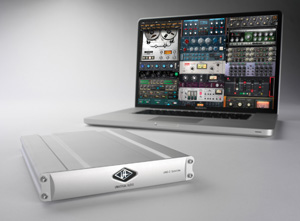
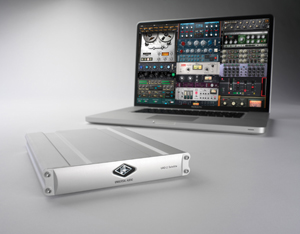
Universal Audio‘s first-ever FireWire 800/400 DSP Accelerators — the new UAD-2 Satellite DUO and QUAD FireWire Accelerator Packages — put the entire UAD Powered Plug-Ins library within easy reach of Intel-based iMacs, MacBook Pros and Mac minis; no PCIe or ExpressCard required. And these units are now shipping to authorized dealers worldwide.

UAD-2 Satellite QUAD and Duo puts UA's popular analog emulation plug-ins within easy reach of Firewire 800 and 400-equipped Macs; no PCIe or ExpressCard required.
Available in DUO or QUAD processor format (with either two or four Analog Devices SHARC processors, respectively), UAD-2 Satellite packages provide a selection of classic analog emulation plug-ins, including the Studer A800 Multichannel Tape Recorder, and SSL E & G Series plug-ins, along with a processing “boost” for DAWs.
Notable UAD-2 Satellite features and capabilities include:
- Access the UAD Powered Plug-Ins library on select FireWire 800- and 400- equipped Macs
- Compatible with modern Intel-based iMacs, MacBook Pros and Mac minis running Mac OS X Snow Leopard 10.6.4 (or higher)
- Run larger mixes in Pro Tools, Logic, Cubase, Nuendo, Performer and more — without taxing host computer CPU
- 5 models to choose from: DUO (Core); DUO Flexi (w/ $500 Plug-In Voucher); QUAD (Core), QUAD Flexi (w/ $500 Plug-In Voucher), and QUAD Omni v5.7 (w/ 50 UAD plug-ins)
The complete line of UAD-2 Satellite DSP Accelerators are available now with prices starting at $899 MAPP USD.
For the latest information on the UAD-2 Satellite, visit UA’s website.
NAMM News: Universal Audio Unveils UAD-2 Satellite Duo and Quad FireWire DSP Accelerators
January 13, 2011 by Janice Brown
/* Filed under News */
Universal Audio has announced the imminent release of its new UAD-2 Satellite Duo and Quad family of FireWire DSP Accelerator Packages. The UAD-2 Satellite puts the entire UAD Powered Plug-Ins library within easy reach of Firewire 800 and 400-equipped computers; no PCIe card installation required.

The UAD-2 Satellite puts the entire UAD Powered Plug-Ins library within easy reach of Firewire 800 and 400-equipped computers; no PCIe card installation required.
Available in DUO or QUAD processor format (with either two or four Analog Devices SHARC processors, respectively), UAD-2 Satellite packages provide a processing “boost” for digital audio workstations, and include a selection of classic analog emulation plug-ins (created with classic brands such as Roland, Neve, Studer, dbx, SSL, Lexicon, Manley, Empirical Labs, Trident, SPL, EMT and more) right out of the box.
This gives computer-based musicians and engineers the warmth and harmonics of classic analog recordings, wherever they mix.
UAD-2 Satellite features include:
- Access the UAD Powered Plug-Ins library on select Firewire 800 and 400 equipped computers
- Compatible with a wide range of modern Intel-based iMacs and MacBook Pros
- Run larger mixes in Pro Tools, Logic, Cubase, Nuendo, Performer and more — without taxing host computer CPU
- 5 models to choose from: DUO (Core); DUO Flexi (w/ $500 Plug-In Voucher); QUAD (Core), QUAD Flexi (w/ $500 Plug-In Voucher), and QUAD Omni v.5.7 (w/ 50 UAD plug-ins)
The complete line of UAD-2 Satellite DSP Accelerators is slated for a Q1 2011 release with prices starting at $899 MAPP.
For the latest release information on the UAD-2 Satellite, visit UA’s website: http://www.uaudio.co
“Analog Classics” Audio Plug-Ins Bundle Highlights New Universal Audio UAD-2 DSP Accelerator
August 3, 2010 by David Weiss
/* Filed under News */
Universal Audio has just updated its UAD-2 DSP Accelerator Packages.
Now all UAD-2 SOLO, DUO and QUAD DSP Accelerator Packages will feature smaller, “greener” packaging, and include the new no-additional-cost “Analog Classics” software bundle.
The “Analog Classics” bundle features:
– LA-2A Classic Audio Leveler — Previously only available for purchase online, this plug-in is an extremely accurate emulation of UA’s electro-optical, analog compressor.
– 1176LN Classic Limiting Amplifier — Also previously only available for purchase online, this plug-in is an extremely accurate emulation of UA’s FET-based hardware unit.
– 1176SE Limiting Amplifier — A DSP-optimized version of the 1176LN,
yielding higher instance counts and its own unique characteristics.
– Pultec EQP-1A EQ — A highly accurate emulation of the classic analog EQ.
– RealVerb Pro Room Modeler — A very flexible and natural-sounding reverb plug-in.
Rick Slater’s Deconstructing the Project: Part II – Tracking!
March 17, 2010 by admin
/* Filed under Tech & Reviews */
Second in a series of in-studio tutorials by Rick Slater, NYC Producer/Engineer/Warrior. Check out Part I: Pre-Pre-Production HERE.
By now, the decision of which tracking facility to use has finally been made. In a delicate balance between vibe, gear, and cost, the ultimate studio for the task at hand has been chosen.
OK, let’s take a reality check here and say that there will always be the likelihood that something will go technically wrong on occasion. The mark of the better studios is the response to said issue and how quickly everyone can get back on track. Those are the studios I try to work in. The key character in this whole plan is the assistant engineer. He/she has probably the toughest gig of the day.
An assistant has to know what everyone has done, is doing, and will be doing in the immediate future. As an assistant to Michael Brauer, it was my job to make sure all the tapes were sent to us and that all songs were complete, all details filled in on the paperwork, etc. before a project. I learned to be really critical about documentation when I once (early in my career) let Michael mix only 24 of 48 tracks because the song title was not changed on the slave reel by the tracking assistant. As it turned out, I should have questioned a slave reel with a song that didn’t have a master even when it did not appear on the list of songs to be mixed. It’s ok to make mistakes but brother you better learn from them!
I just finished a gig with Derek Trucks featured on a song for Dr. John where the song title had changed and every new person involved had a moment of panic as they thought we were working on the wrong tune. Fortunately my moment came earlier and I had quickly gotten a handle on what was going on.
Now, as the engineer on a date it is very important that I convey all session details to my assistant. If you don’t have an assistant, it’s important to take a moment and document what you are doing along the way. As a mixer there is nothing worse than pulling up the track labeled “Audio 11”!
BE PREPARED, BE VERY PREPARED
Before the session, I speak with the client and I find out what it is we are looking to accomplish. It’s important that all of the artist’s gear is in top shape for the session. Sometimes additional rentals are involved and it’s important to use a reliable company with quality gear (i.e. Jim Flynn Rentals or Dreamhire for audio gear, Arty Smith and SIR for musical instruments.) Be sure that the studio is expecting a delivery of equipment and that everyone knows what time delivery is expected. I will often bring along my own gear to supplement the equipment as well.
For drums I have a spare key and moon gel to dampen the heads. For guitar I bring along a Little Labs PCP Distro to route to multiple amps, re-amping etc. I also have a rack of outboard with some vintage compressors and EQs. My “vibe bag” contains a few candles, a lamp, and a handful of vintage pedals too. I try my best to get to know the personalities of the people I will be working with and create an atmosphere that puts them at ease, yet gets them motivated to do their best.
On the day of the session I want to make sure that all the mics and outboard as well as cue systems are set up and tested before the client walks in. I once had to record Maureen McGovern live in the studio with her whole stage band for a children’s album. At the time Maureen was playing on Broadway and it was made very clear to the producer and me that she must be in her make-up chair at 5pm.
I had chosen Quad NYC’s Studio A for its spacious studio, control room, and three large iso booths with a great line of sight. As it turned out, one of the Pro Tools I/O boxes malfunctioned and caused the cue system to fail during the session. This meant that I had to calm the musical director’s nerves who was in turn making the young assistant nervous which led to the producer being agitated, while the entire process was being filmed. We were able to calm everyone down, identify the problem, replace the I/O and get rolling in about thirty minutes. I tracked the entire song, got an extra vocal pass for any fixes needed and had Ms. McGovern off to the theatre by 4pm. Phew! It was critical that day that everything was set-up and working prior to the session so that when the unexpected happened we were still able to accomplish our goal.
DRUM TRACKING – KIT & MIC PLACEMENT
When working with drum machines and synthesizers, the sounds are pretty much there to begin with, so a little subtle EQ and or compression to fit the song is usually enough. When working with live instruments, however, you will need to really get down to work. For drums it is critical that the condition of the drums are in top working order and that they are properly tuned. I use Moon Gel to dampen the heads if needed. They sound much more like the true nature of the drum then all the strange things which have been taped to drum heads in the past.
The first question is where in the room to put the kit. Assuming that you don’t have other instruments that require the use of the main live room, I like to put the drums in the main room and the other instruments in isolation.
I start by deciding if I want a tight or an open sound for the drums. I’ll walk around the studio talking, listening to how the room sounds and pick my spot.
When getting sounds, I start with kick and usually use a dynamic mic like the Senheiser MD 421 or AKG D112 inside with a condenser like the Neumann U47 FET or Shure KSM44 out front. When I’m looking for a big bottom sound, I’ll add a sub-kick mic, which is actually a speaker used as a mic [Fig.1].
At times I have also used another drum as a resonator and miked that drum [Fig.2]. I use this technique when I want the kick drum to have an extended bottom end. When using a resonator, I mic it with a Large Diaphragm Condenser (LDC) fairly close to the head. (Remember it’s not being struck it’s just vibrating sympathetically.)
Next up I go for the overheads. This will capture the overall sound of the kit so I get the overheads right after the kick. The live kit is a whole so it is important that the overhead mics show the whole picture. I once had a tech comment on my good snare sound when in fact he was only hearing kick and overheads! I tend to like tube mics on the overheads, my favorite being an AKG C24 but LDCs work well too.
For snare, I always make sure that the drum we use is not occupying the same frequency range that the vocal will be in. This keeps the two most important elements of a mix (melody and rhythm) sounding big and up front. One of my secrets to great snare sound is to place the snare stand on a small piece of wood so the snare reflects up into the mics. I usually just mic the top with both a Shure SM 57 and a small diaphragm condenser (SDC) bussed to a single track. The 57, I mult to a gate and compressor and print to a separate track. This gives the drums a more finished sound right off the bat and gets everybody excited as the overdubs take place.
For toms, I usually go for an LDC and if printing to tape I slam it hard. If going to digital, some compression with medium fast attack and fast release are in line as well. For the room mics I prefer ribbons but LDC’s work well too. If you are experienced in the art of compression I say apply liberally to these tracks.
TRACKING BASS & GUITAR: MIKING AND SHAPING SOUNDS
A great bass sound comes from the player’s fingers and that’s a fact. I try to use a high quality DI, which I compress with either an LA3A or an 1176 and print to a track. If we are using an amp I listen carefully to the relationship of the DI signal and the amp as I slowly move the mic around. (OK the assistant moves, I listen.) Of course, you can address this issue inside your DAW, but I’ve had better luck getting a great bass sound by sticking to the basics of mic placement.
Acoustic basses may vary so you need to listen and consider the arrangement to make sure you are getting what you need from the recording. Often miking closer to the fingerboard is necessary to get the attack, other times the player might have a decent pick up that works well for this approach. I often combine a couple of mics. To get body, listen for the sweet spot — usually near the f-hole — and for attack I find a spot near where the fingerboard attaches to the body. I seem to have gotten my best results using condenser rather than ribbon mics. I follow a similar approach on acoustic guitar, using ribbon or condenser mics.
At this point I always have the bass player and drummer play together to make sure there is plenty of sonic space for each instrument.

Fig.3 Tracking Derek Trucks' guitar, I used a blend of the Altec 633c and Neumann U87 on the Fender Super Reverb, which was fed from my Little Labs PCP Distro box, as was a Fender Deluxe miked with a Shure 57 and Neuman U87, which in turn were bussed together to a second track.
When recording electric guitars, I rarely use EQ except on the amp. Rather, I use a combination of ribbon, condenser, and dynamic mics to create the sound of the guitar. (Fig. 3) Rarely do I compress while recording a guitar amp as it already sounds compressed coming from the amp. One can get an edgier feel by miking closer to the grill, but I tend to back off 4-6” to allow the sound to bloom a bit.
If there is a mic up somewhere else in the room, I always throw its fader up and listen. Sometimes a splash of ambient mic really adds the right dimension to the part.
I’m a big fan of printing effects on the guitar if it’s part and parcel of that part. Like the gated and compressed snare track, it excites everyone as the recording continues and shapes the direction of the material.
One new technique I’ve tried successfully is to let the guitar player nail the performance at home with a direct signal and re-amp that. We used that approach with Cherry Suede. We booked time at The Clubhouse Studio, up in Rhinebeck, NY, where they had a gazillion amps and — in two and a half days — we re-amped 55 tracks of guitars. Of course, as we speak the state of amp simulators is advancing and using a real amp isn’t always necessary for re-amping. Again it is really important to take time to document your set-up; you never know when you might want to recreate a sound.
VOICE EXERCISES & SPACE EXPLORATION
I always record a scratch vocal while tracking. It helps the rest of the band mark its place and tends to elevate the energy level of the entire band. I go for the best vocal sound I can get in hopes of capturing the magic performance.
In my mind there is no go-to set-up for vocalists. I try a couple of things quickly so not to burn out my singer while keeping in mind how the vocal works with the track. Whenever possible, I try to set the right ambience for the singer in the space where we are working. (Remember the vibe bag?) I want the performance to transport me to the same place that the song originally took them when they wrote it, and sometimes you need to set the stage.
Now if the gear needs to be in top shape for the recording, imagine what a vocalist must do. Their voice is the instrument and that, too, has to be in top shape! If I am producing the singer, I like to have them involved with cardio-vascular exercise at least three times a week. I used to use a studio down on the Jersey shore where we would swim or jog for an hour in the morning before recording vocals. It speeds up the warm-up time in the studio and makes the end of a vocalist’s range much more stable.
Earlier, I touched on adding a little ambient miking and, truth be told, I am always looking for spaces that musicians sound particularly exciting playing in. If the space is exciting and it fits the song, then I make sure that I capture that sound in my recording.
My most favorite unusual spaces to record in over the years include: the elevator shaft at the original Sigma Sound, recording a Marshall half stack in the fire stairs of Quad NYC (that had the staff at Unique calling on the phone!), and the front over-hang in the drive way of Milkboy Recording in a residential neighborhood of Philadelphia.
OK, well that’s all for my approach on tracking — it would be great to hear about some of your more interesting set-ups!
Creating a great experience for musicians and capturing the magic that they produce isn’t an easy job but it is rewarding. Hopefully some of you will share your stories here as well.
Rick Slater is a NYC-based producer/engineer who’s recorded and/or mixed with Chuck D, Robben Ford and James Chance, and worked in NYC studios such as Mediasound, Quad and Sony. Meet him on Myspace: www.myspace.com/rickslater.